Runny Ink Brushes for Illustrator: A Graphic Design Asset Review
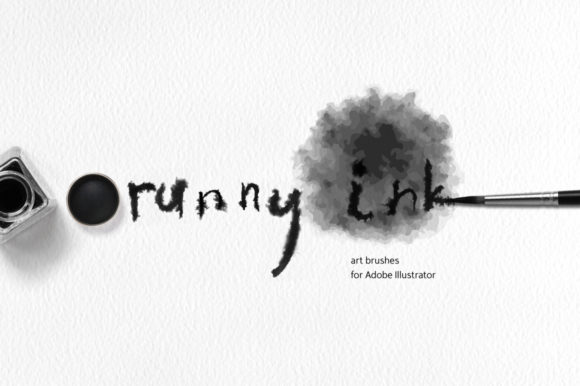
As a brand designer and content marketer, I'm always on the lookout for creative design tools that can elevate my visual storytelling. Recently, I came across Runny Ink vector art brushes for Adobe Illustrator, a set of 13 art brushes based on real hand painted ink and watercolor brush strokes. This graphic design asset immediately caught my attention with its organic feel and versatility. In this review, I'll explore how these brushes can support branding, marketing, and visual content creation in practical ways.
A First Impression: Mood and Emotional Tone
The first thing that stands out about Runny Ink Brushes for Illustrator is the mood they create. The subtle variations in stroke width and texture evoke a sense of craftsmanship and authenticity. These brushes bring a handmade quality to digital designs, which can be especially appealing for brands that want to convey a story or connect with an audience on a personal level.
Whether you're designing for a lifestyle brand, a seasonal promotion, or editorial content, these brushes add a layer of warmth and character. They work well for casual branding, premium visuals, handmade products, and event promotions. The emotional tone they bring is gentle yet expressive, making them ideal for campaigns that aim to build trust and engagement.
Real-World Application in Marketing and Branding
Let's imagine a scenario where a small business is launching a new line of natural skincare products. As part of their marketing strategy, they need social media graphics, product packaging, and website banners that reflect their brand identity. Here's where Runny Ink Brushes for Illustrator shine.
These brushes can be used in various aspects of the campaign, including:
- Brand identity: Incorporating the brushes into logo design or packaging design can give the brand a unique and memorable look.
- Social media graphics: Creating Instagram posts, Pinterest pins, and Facebook ads with these brushes adds a touch of creativity and visual interest.
- Editorial design: Using them in blog graphics or website headers helps maintain a consistent visual theme throughout the content.
- Digital ads: They can enhance the appeal of email banners or promotional banners by adding a soft, artistic flair.
With their ability to blend seamlessly into different design contexts, these brushes support stronger first impressions, clearer visual hierarchy, and more consistent branding. They also help in creating a professional appearance that resonates with the target audience.
Where These Brushes Work Best
Runny Ink Brushes for Illustrator are particularly effective in several key areas of marketing and branding:
- Hero graphics: They add a decorative element to campaign headers or product launch visuals without overpowering the message.
- Branded templates: Perfect for creating Canva templates or printable design assets that align with the brand's visual identity.
- Promotional banners: Their soft, flowing strokes make them ideal for creating eye-catching banners for online promotions.
- Decorative brand elements: Use them as accents in packaging design, product labels, or merchandise to enhance the overall aesthetic.
These brushes can also be integrated into content bundles or media kits, offering a cohesive set of design elements that reflect the brand's personality.
Where to Use with Caution
While these brushes offer a lot of creative potential, there are certain situations where they may not be the best fit. For example, they might not be suitable for formal corporate branding or dense information layouts where clarity is crucial. Similarly, using them in small mobile graphics or low-contrast backgrounds could lead to readability issues.
It's also important to avoid using them in text-heavy ads or designs where the asset competes with the main message. Always ensure that the visual elements support, rather than distract from, the core message of the campaign.
Practical Brand Designer Notes
To get the most out of Runny Ink Brushes for Illustrator, consider the following tips:
- Test with your brand color palette: See how the brushes interact with your existing colors to maintain visual consistency.
- Check black and white usage: Ensure that the brushes don't lose their impact when converted to grayscale.
- Place inside real campaign mockups: Preview how they look in actual design contexts like social media covers or packaging accents.
- Preview on mobile screens: Confirm that the brushes remain legible and visually appealing on smaller devices.
- Compare with competitor visuals: Assess how these brushes differentiate your brand's design from others in the market.
- Confirm commercial licensing: Before using them in paid campaigns or client work, make sure you have the appropriate commercial license.
By testing these brushes against different font styles, spacing, and balance considerations, you can ensure that they complement your brand's visual language effectively.
Conclusion: A Strong Design Asset for Content Creators
Overall, Runny Ink Brushes for Illustrator offer a versatile and high-quality option for designers looking to add a unique touch to their marketing materials. Whether you're working on a small business branding project, a digital ad campaign, or a content marketing initiative, these brushes can help you create visuals that stand out and resonate with your audience.
From their ability to enhance visual hierarchy and improve audience trust to their compatibility with a wide range of design formats, Runny Ink Brushes for Illustrator are a valuable addition to any designer's toolkit. With careful consideration of their use cases and limitations, they can be a strong asset in supporting your brand's creative goals and visual storytelling efforts.